How to collect wedding RSVPs on WhatsApp - templates and reminders
To collect wedding RSVPs on WhatsApp, message each invited household with the wedding date, who is invited, a reply deadline and a clear question for each guest. Record replies in one list, remind only those still outstanding, and follow up personally before treating a missing response as a decline.
A wedding RSVP should settle one question: who’s coming? Instead, you get a heart reaction, a “can’t wait!” from someone replying for an unspecified number of people, and an aunt who told your mum she was probably coming in a conversation nobody wrote down.
WhatsApp is a perfectly good place to collect replies - as long as the question is clear, there’s a deadline, and every answer lands in one list rather than your memory. Here’s a simple system, with wording you can copy.
Jump to: the RSVP request · reminders · guests who haven’t replied · WhatsApp tips · quick answers
Start with one guest list
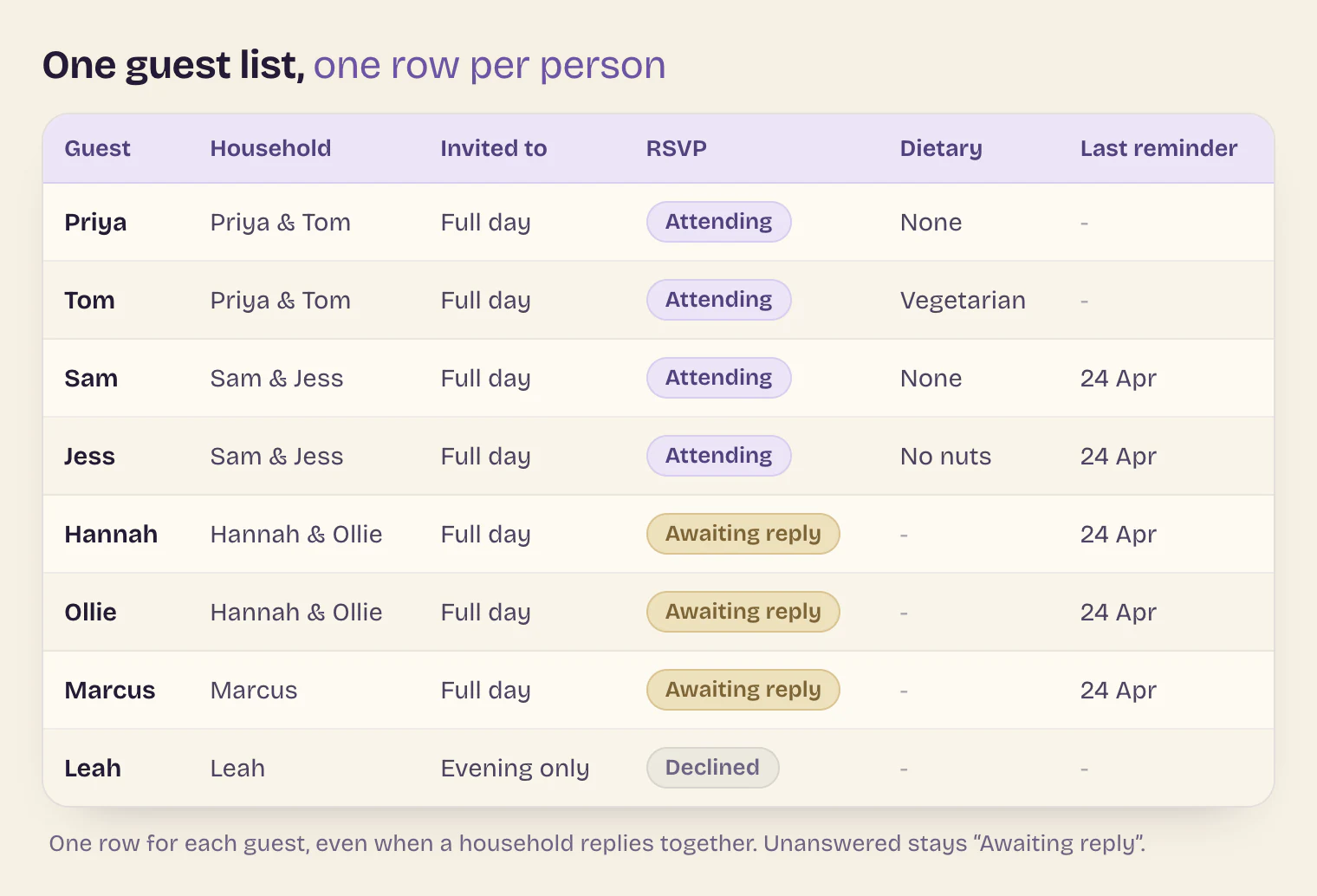
Make a list with one row per invited person. A household can share one message, but each person needs their own answer. Track:
- Guest, household, and who replies for them.
- What they’re invited to: full day, evening only, or named events.
- RSVP: awaiting reply, attending or declined.
- Plus-one, and their name once confirmed.
- Dietary needs, including a clear “none”.
- When you last reminded them.
For a multi-day wedding, give each event its own attendance column. Leave every unanswered invitation as awaiting reply - never quietly turn a “maybe” into a yes. And put one person in charge of the list, so a reply sent to your partner or a parent still reaches it.
 Tap to open full size
When you check numbers against the budget, count confirmed guests separately from outstanding ones - the wedding budget calculator shows what your count means per head.
Set a deadline that leaves room
Work back from your earliest supplier deadline - venue, caterer, rooms or transport - and set the guest deadline a week or two before it, so there’s time to chase. As a starting point, give guests three to four weeks to reply, and bring it forward if travel, visas or room bookings need earlier decisions.
A save-the-date isn’t an RSVP request: guests need the date, the place, what they’re invited to and any significant cost before they can decide. For a destination wedding, ask who’s interested first and for a firm RSVP later - and keep the two lists separate.
Template 1: the RSVP request
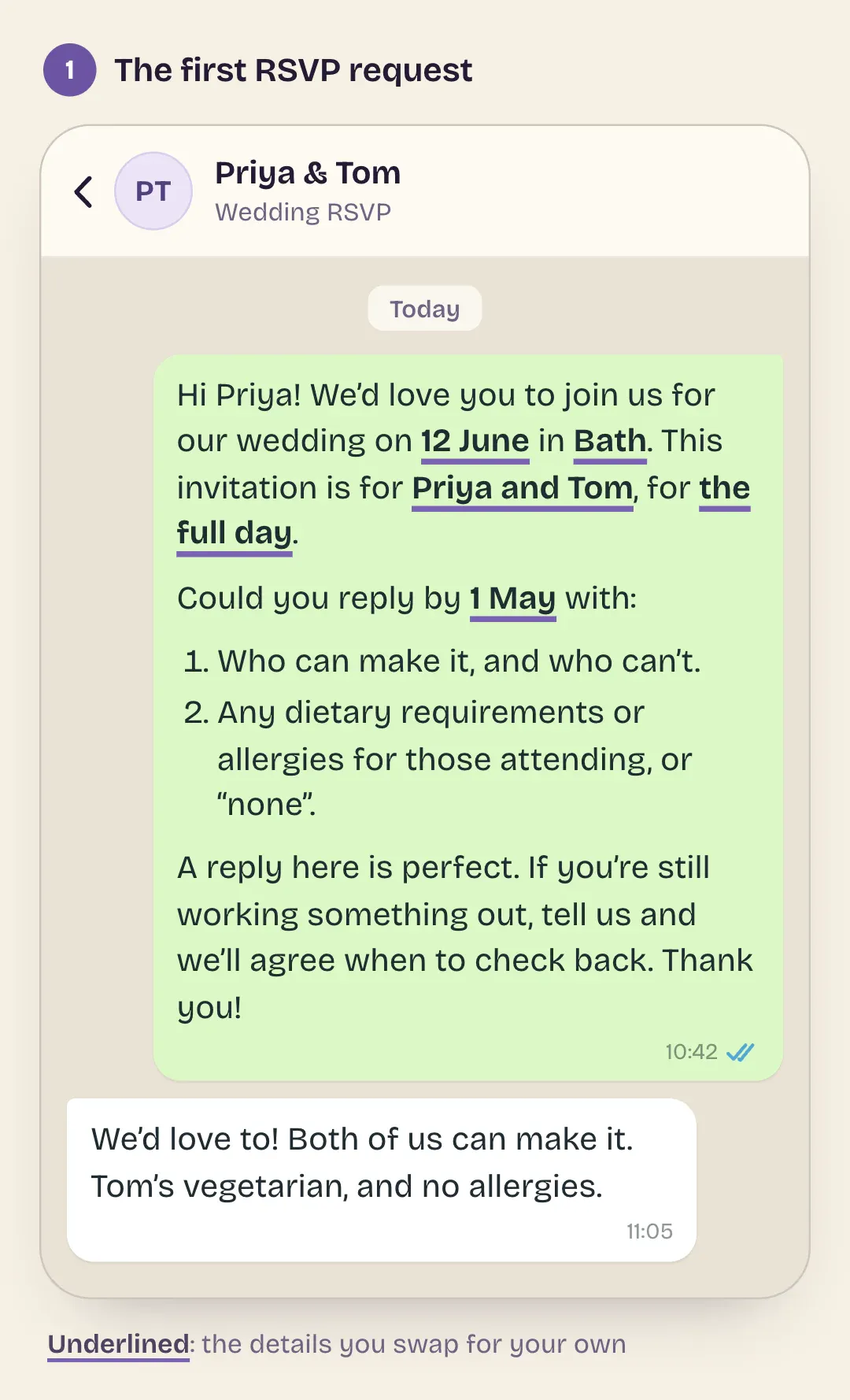
Send this privately to each household, naming everyone the invitation includes.
Hi [name]! We’d love you to join us for our wedding on [date] at [venue, town]. This invitation is for [invited names], for [the full day / the evening reception from time / named events].
Could you reply by [RSVP deadline] with:
- Who can make it, and who can’t.
- Any dietary requirements or allergies for those attending, or “none”.
[Details link, if you have one.]
A reply here is perfect. If you’re still working something out, tell us and we’ll agree when to check back. Thank you!
For several events, swap the first question for: “For each person, could you tell us yes or no for [event A] and [event B]?” Ask only what you need now - flight numbers and song requests can wait. And keep one reply route: if replies should go to a planner or concierge, say so instead.
Be explicit about who’s invited
An RSVP should confirm the invitation, not reopen the guest list. Name everyone invited. If there’s an open plus-one, say so and ask for their name; if there isn’t, never ask “How many of you are coming?”.
For a guest without a plus-one, add:
Just to keep the guest list clear, this invitation is for [name] only. We hope you can join us.
If they reply for an extra person, settle it before confirming:
We’d love to include everyone, but we’re only able to host the people named on the invitation. Could you confirm whether you’ll be joining us on your own?
Keep the reason honest - no invented venue-capacity excuse. If you haven’t settled the rule yet, here’s how to make your plus-one policy clear. For evening guests, put the arrival time and “evening reception” in the message, so nobody has to guess what an evening invitation includes.
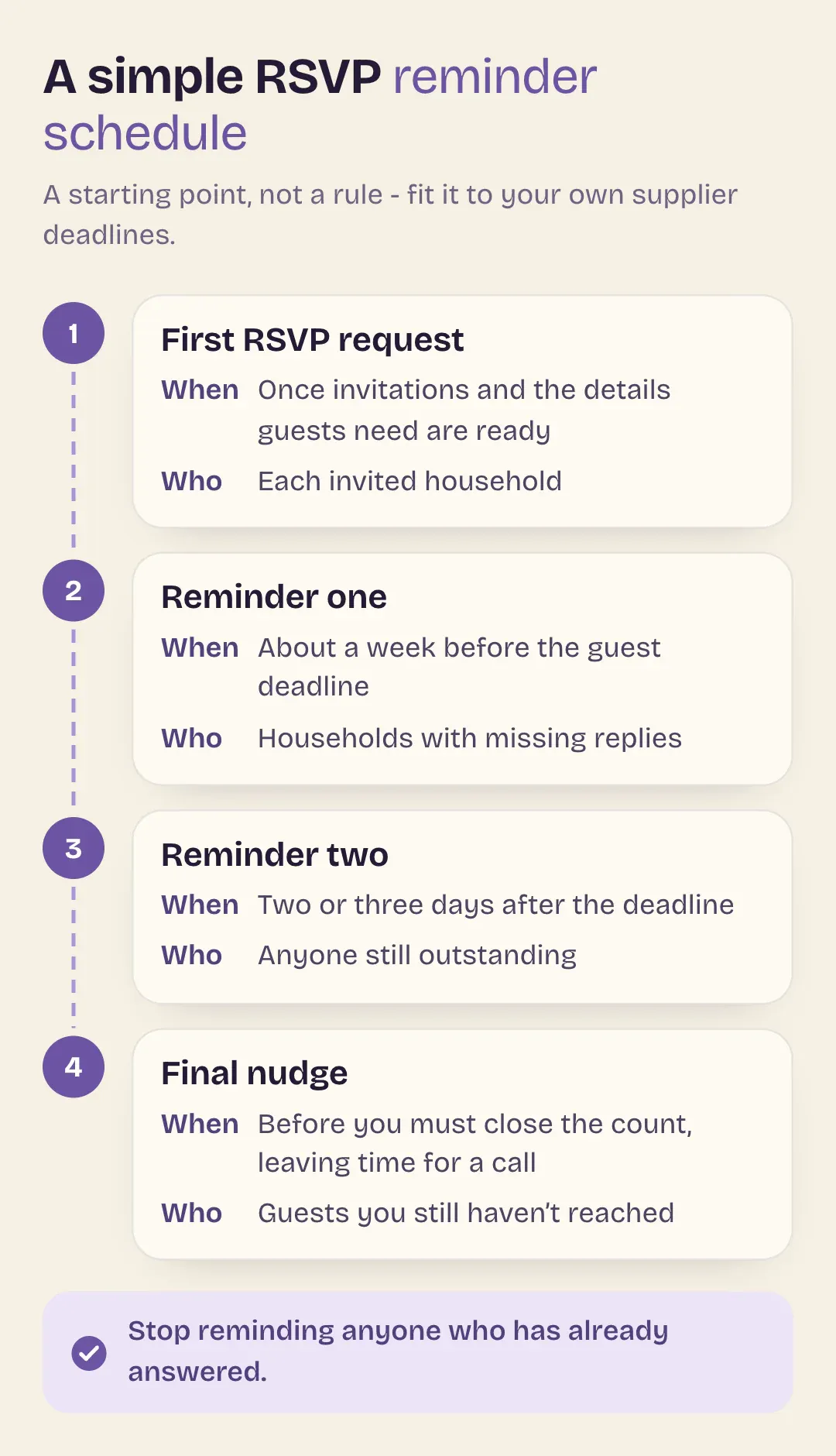
When to send reminders
Remind only the people you’re still waiting on. If someone’s waiting on a work rota, agree a date to check back instead of sending every reminder.
Template 2: the first reminder
About a week before the deadline:
Hi [name], a little wedding RSVP reminder from us. Could you let us know by [deadline] whether [invited names] can join us on [wedding date]? A yes or no for each person is perfect. If you’ve already replied somewhere else, tell us and we’ll update our list. Thank you!
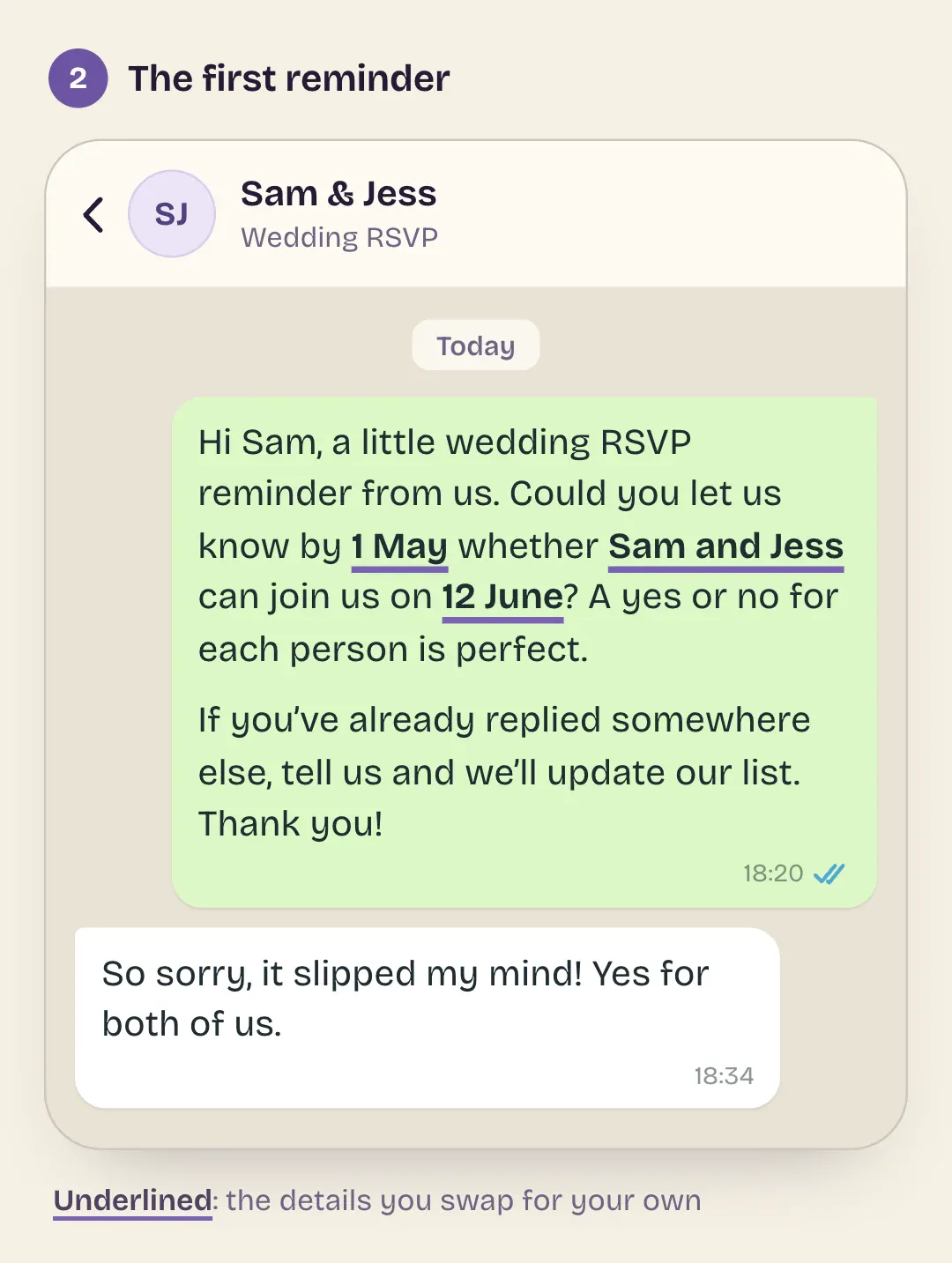
That last line allows for the perfectly plausible possibility that they told your dad in the supermarket.
Template 3: after the deadline
Be clearer, not more apologetic - and give a real new deadline that fits your supplier’s timetable.
Hi [name], we’re closing our wedding numbers and still need an RSVP for [invited names]. Could you reply by [new deadline] to let us know who can come? It’s completely fine if you can’t make it. We just need a definite answer for the count. If something’s holding up the decision, please tell us.
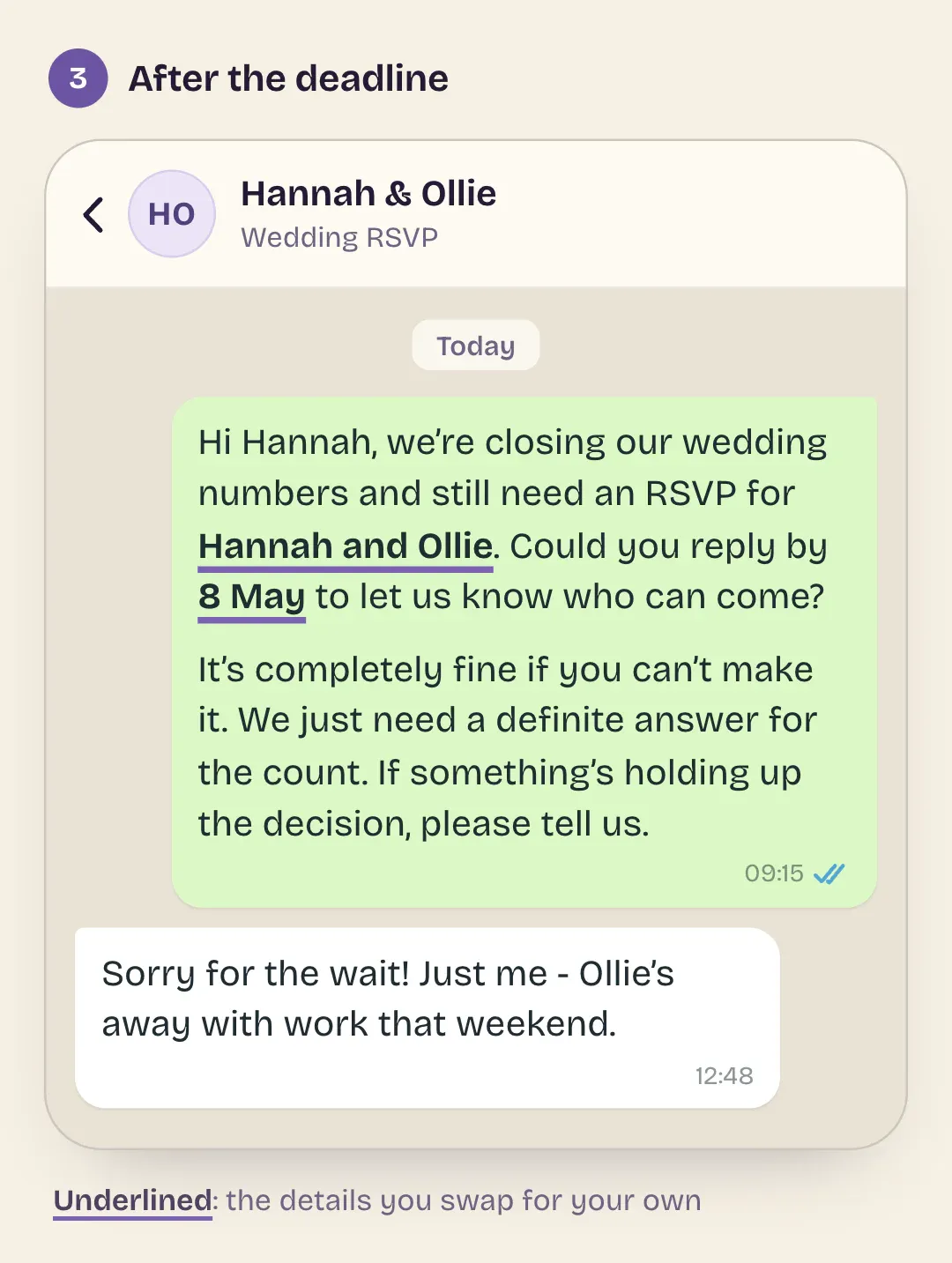
If someone says “probably”, ask what they need to confirm and agree the latest date you can hold their place. It isn’t a yes yet.
Template 4: the final nudge
Only when you genuinely need to close the list - and alongside a call if earlier messages went unanswered.
Hi [name], one last check before we finalise our wedding numbers. We haven’t been able to confirm whether [invited names] can join us. Could you let us know by [final deadline]? If we don’t hear back, we’ll need to leave you out of the final count. If that’s a mistake, please call or message us before then. We’d hate to miss you because a message got lost.
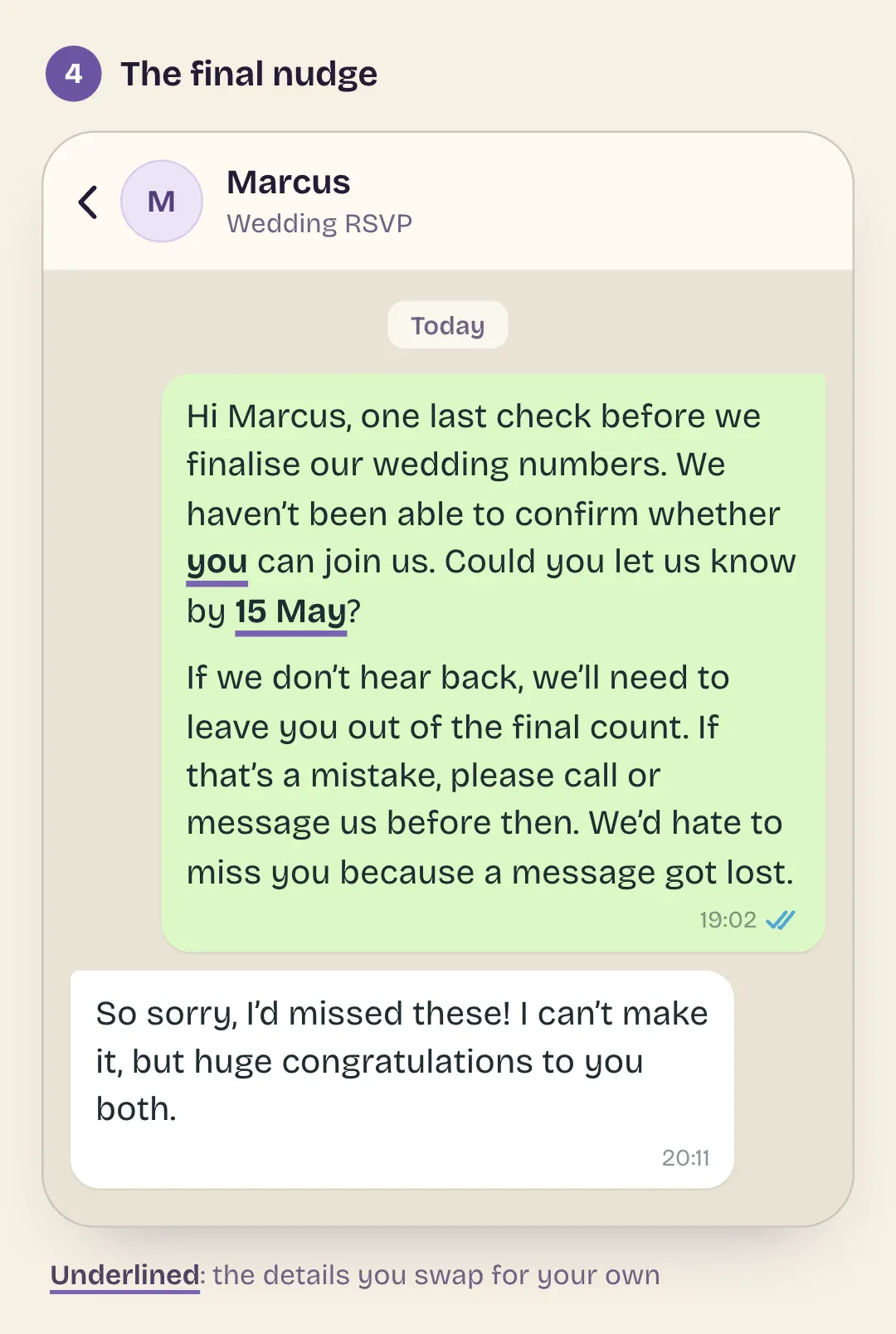
It’s a boundary, not a punishment. Afterwards, record what actually happened: “no response, not in the final count” is different from “declined”. If they reply later, check what your venue can still accommodate before promising a place.
If someone still hasn’t replied
- Check the message reached the right person, and that nobody else already has their answer.
- Call. For a relative who isn’t comfortable on WhatsApp, take their RSVP by phone or ask a trusted family member to help.
- Never post a list of non-responders in a family chat.
- Give people room to say no. “No” is useful information, not a failed invitation.
Confirm every answer
Once you have a decision, confirm it back:
Thank you! We’ve got [names] down for [events]. We’ve noted [dietary requirements / no dietary requirements]. If anything changes, just message us here.
And for a no:
Thank you for letting us know, [name]. We’ll miss you, and we completely understand. We’ll raise a glass to you on the day!
If dietary details are still missing, ask for them separately rather than holding the whole RSVP open.
WhatsApp features that help
- Message households privately. Don’t collect RSVPs in a group chat or with a poll: everyone in the group sees every answer, and in a poll, who voted for what.
- Broadcast lists can save time on identical reminders. Each person gets the message privately and replies only to you. But a broadcast only reaches contacts who’ve saved your number, and it can’t add their names - so check every reply against your list.
- Make a custom chat list called “Awaiting reply”. Add the households you’re waiting on and take them off as answers arrive. Lists live in the filter bar at the top of your chats.
- Keep ID documents out of the RSVP. If a hotel needs passport details, ask separately, nearer the time, and only for what it requires.
Or let Maya handle it
Everything above works. It’s also a lot of copying, pasting, answering and updating - across dozens of chats, while you’re planning a wedding.
Maya is a WhatsApp wedding concierge who takes the legwork off you:
- Guests message Maya, not you. She answers their questions day or night, in their own language, from your wedding details and her own know-how.
- Every RSVP lands in one running count - who’s coming to what, plus-ones included, with dietary notes filed to the right guest.
- Only decisions come to you. When she doesn’t know an answer, she checks with you, then gets back to the guest.
No spreadsheet to babysit, no forty threads to scroll. You make the decisions; Maya keeps the conversations.
Bring Maya to your weddingQuick answers
Can you collect wedding RSVPs on WhatsApp?
Yes. Message each invited household with the date, location, invited names, invitation type and reply deadline. Ask for a definite answer for each person, then record those answers in one guest list. Offer another way to reply for guests who don't use WhatsApp.
What should a WhatsApp wedding RSVP message say?
Who is invited, what they're invited to, when and where it is, and when you need a reply. Ask who can attend and collect any dietary information you need. Make it clear whether guests should reply in the chat or use a separate RSVP route.
When should you chase wedding RSVPs?
A useful starting point is a reminder about a week before the deadline, a follow-up a few days after it, then a final personal check before supplier numbers close. Adjust this to your actual deadlines, and stop reminding anyone who has already answered.
How do you politely chase guests who haven't RSVP'd?
Keep the message private, brief and specific: "Could you let us know by [date] whether [names] can join us? It's completely fine if you can't make it - we just need a definite answer." If messages go unanswered, try a call rather than sending endless reminders.
Does no RSVP mean a guest isn't coming?
Not automatically. A missing reply is an unknown, not a decline. Check that the guest received the invitation, try to reach them personally and explain your final deadline. If you must close the count without an answer, record that separately from a confirmed decline.
How do you handle plus-ones in a WhatsApp RSVP?
Name everyone invited. Where an open plus-one is included, say so and ask for their name once confirmed. Where it isn't, avoid open-ended questions about party size. If someone adds an uninvited guest, clarify the invitation before confirming their attendance.